Every business intelligence system can answer questions. That's table stakes. You ask "What's my utilization?", and it tells you. You ask "Which clients owe us money?", and it shows you a list.
But here's the problem: most critical business issues in law firms aren't discovered by partners asking the right questions. They're discovered when it's already too late—when the client relationship has deteriorated, when the matter has become unprofitable, when the cash flow crisis has arrived.
The difference between reactive intelligence (answering questions when asked) and proactive intelligence (surfacing issues before they're asked about) is the difference between a system that's occasionally useful and one that's genuinely valuable.
The Reactive Model: Dashboards
Traditional business intelligence operates on a pull model. Information sits in dashboards, waiting for someone to come looking for it. This creates three fundamental problems:
Problem 1: You Have to Know What to Look For
A partner logs into the dashboard. They see dozens of metrics. Revenue. Utilization. Realization. WIP. Lock-up. Collection rate. Outstanding invoices. Client profitability. Matter profitability.
Which one matters right now? Which one has changed in a way that requires action?
The dashboard doesn't tell you. It just presents data. The burden is on the partner to know what to check, when to check it, and what threshold should trigger concern.
This is cognitive load that busy partners simply don't have bandwidth for. So they check the one or two metrics they understand, maybe take a screenshot for a meeting, and log out. The critical issue hiding in metric #7 goes unnoticed.
Problem 2: You Have to Remember to Look
Even if a partner knows what matters, they have to remember to check it regularly. But dashboards don't remind you they exist. They sit passively, waiting.
Meanwhile, the partner is drowning in client work, court deadlines, emails, meetings, and administrative tasks. "Check the dashboard" is always the lowest priority item on an impossible list.
By the time they remember to look, the £18,000 of unbilled time has been aging for 90 days instead of 45. The client relationship that was salvageable is now hostile. The associate's utilization that was trending down has hit crisis levels.
Problem 3: Important Issues Hide in Plain Sight
Here's a real example: A partner has 15 active matters. Twelve are performing well. Two are fine but need watching. One has £18,400 in unbilled time that's aged past 45 days and is now at risk.
When the partner looks at their dashboard, they see their aggregate numbers. Overall utilization: good. Total WIP: within normal range. Average realization: on target.
The problem matter is hidden in the aggregate. It's 1/15th of the partner's caseload, so it doesn't move the overall numbers enough to look alarming. The dashboard shows everything is fine.
But that one matter represents nearly £20K in revenue at risk. The client is probably frustrated. The relationship is degrading. And nobody notices until it's too late because the reactive model requires someone to specifically drill down into that particular matter to see the problem.
The Proactive Model: Intelligence Feeds
Proactive intelligence inverts this model. Instead of waiting for partners to ask questions, the system continuously monitors for situations that need attention and surfaces them automatically.
This is what we call the Intelligence Feed in Cognify. It works more like a news feed or inbox than a dashboard:
The system identifies issues that require attention
It prioritizes them by urgency and potential impact
It surfaces them in a feed that partners actually check (Teams)
It provides context about why this matters and what actions are available
It persists until acknowledged, ensuring nothing falls through cracks
Real Examples of Proactive Intelligence
Here's what proactive intelligence looks like in practice:
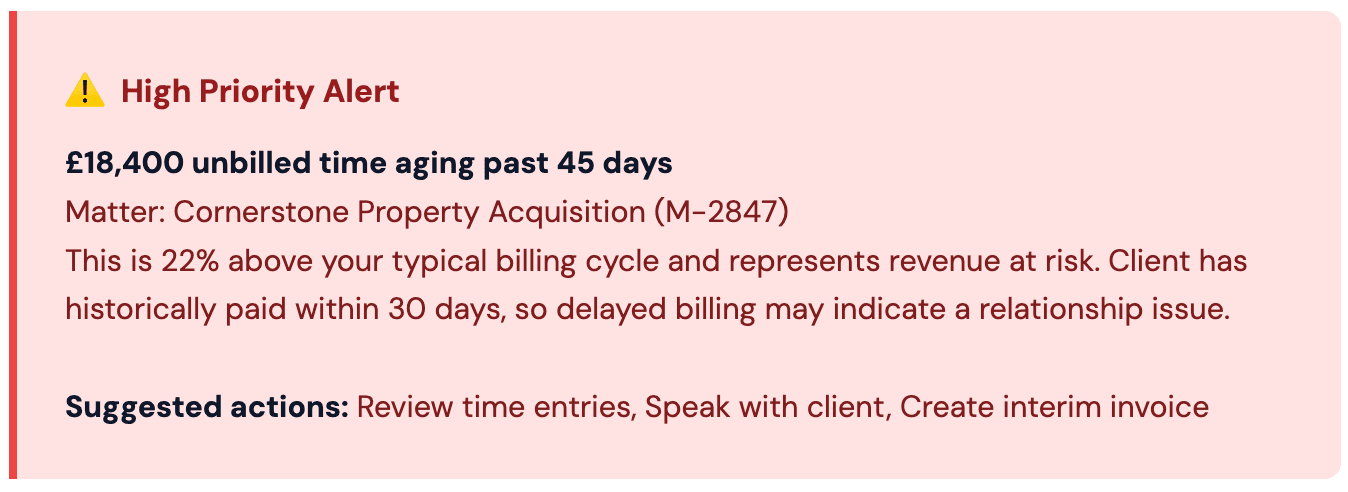
Notice what this alert provides that a dashboard doesn't:
Automatic detection:
The system found the issue without being asked
Priority indication:
"High Priority" tells you this needs attention now
Context:
It explains why this matters (revenue at risk, relationship issue)
Comparison:
"22% above your typical billing cycle" provides benchmark
Interpretation:
It connects billing delay to potential relationship problem
Action options:
Concrete next steps, not just data
The partner didn't need to know to check WIP aging. They didn't need to remember to filter by matter. They didn't need to calculate whether 45 days was concerning for this particular client. The system did all of that and presented the actionable insight.
More Proactive Scenarios
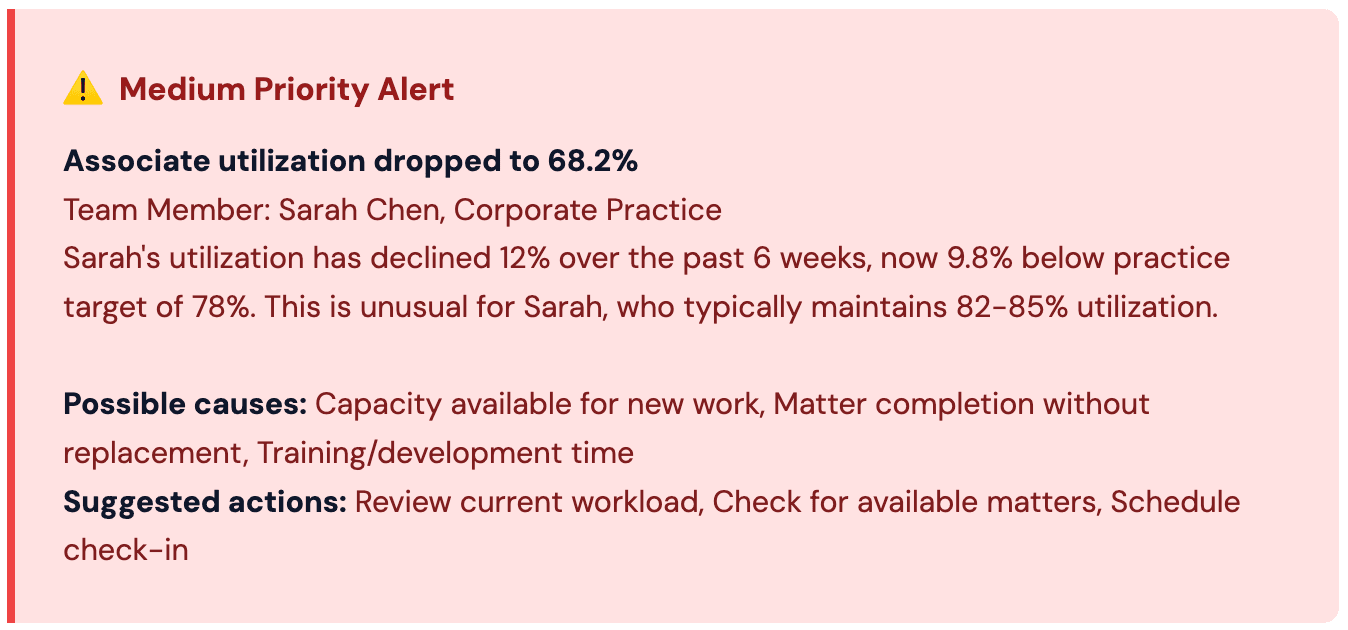
Again, the system provides context and interpretation:
Not just the current number (68.2%) but the trend (12% decline)
Not just the target gap but the personal baseline (usually 82-85%)
Possible explanations, not just raw data
Specific actions appropriate to the situation
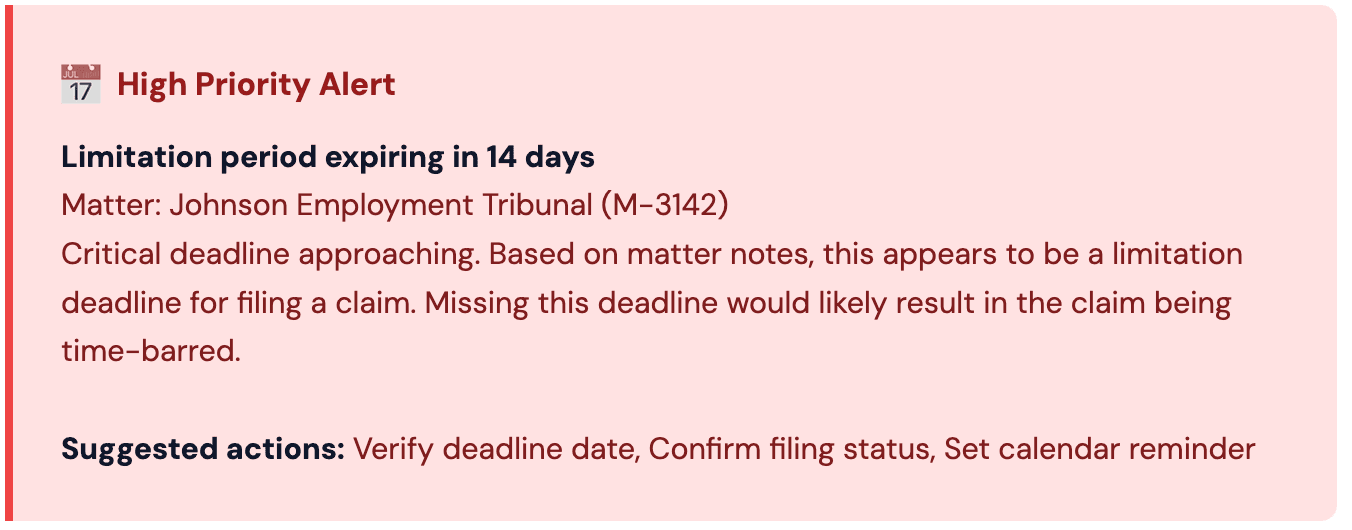
The system isn't just tracking dates—it's understanding which dates are critical, why they matter, and what the consequences are of missing them.
The Attention Economics Problem
Partners have approximately 30 seconds of attention available for business intelligence in any given day. That's not an exaggeration—it's the reality of being client-facing with back-to-back meetings, constant emails, and court deadlines.
This creates a brutal constraint: your BI system gets 30 seconds. What will it do with that time?
Reactive (Dashboard) | Proactive (Intelligence Feed) |
Partner decides what to check | System decides what needs attention |
Partner interprets what data means | System explains why it matters |
Partner determines if action needed | System suggests specific actions |
Partner must remember to look | System surfaces when relevant |
Important issues can hide | Important issues are prioritized |
Requires domain expertise | Provides context and interpretation |
In 30 seconds with a dashboard, a partner can maybe check 2-3 pre-defined metrics and confirm they're in the normal range. That's it.
In 30 seconds with an Intelligence Feed, a partner can:
See that three issues need attention today
Read the context for the highest priority one
Take an immediate action or delegate it
Mark it as handled
The difference is that one model makes the partner do all the cognitive work of finding, interpreting, and prioritizing issues. The other model does that work for them and presents only the actionable insights.
Building Proactive Intelligence
Creating effective proactive intelligence requires three things traditional dashboards don't have:
1. Business Logic, Not Just Data
The system needs to understand what matters in a law firm. This isn't just thresholds—it's contextual rules:
£18K unbilled time at 45 days is concerning for a client that normally pays in 30 days, but might be normal for a different client
Associate utilization at 68% needs attention, but trainee utilization at 68% might be appropriate
Invoice aging 31 days is concerning for a £50K invoice, less so for a £2K invoice
Matter profitability 15% below budget is a red flag, but might be expected at certain matter stages
Proactive intelligence requires encoding the expertise that a practice manager or finance director would apply when looking at the data.
2. Continuous Monitoring, Not Periodic Reporting
Dashboards are typically refreshed nightly or even less frequently. By the time the dashboard shows a problem, it's already been a problem for hours or days.
Proactive intelligence requires near-real-time monitoring. When unbilled time crosses the 45-day threshold, the partner should know that day, not three days later when they next log into the dashboard.
3. Push Delivery, Not Pull Access
The intelligence must come to the partner, not wait for the partner to come to it. This means integration with tools partners actually use daily:
Teams notifications for high-priority alerts
Intelligence Feed tab in Teams that updates continuously
Email digest for end-of-day summary
Badge counts showing unresolved issues
The system must be persistent without being annoying—important issues don't disappear until addressed, but partners control notification preferences.
The Shift in Mental Model
The Shift in Mental Model
Reactive intelligence assumes partners are analysts who will regularly review data, identify patterns, and spot anomalies. This assumption fails in law firms where partners are client-focused and time-poor.
Proactive intelligence assumes partners are decision-makers who need to be told what requires their attention, given context for why it matters, and presented with clear action options.
This isn't about dumbing down the intelligence—it's about respecting the reality of how law firm partners actually work and what they have bandwidth for.
The Implementation Challenge
Building proactive intelligence is harder than building dashboards. Dashboards are essentially query interfaces over a database. Proactive intelligence requires:
Understanding law firm business rules and what constitutes an issue
Contextual analysis that considers baselines, trends, and peer comparisons
Priority ranking algorithms that surface the most important issues first
Natural language generation to explain why something matters
Integration with communication tools for push delivery
State management to track which issues have been addressed
This is why most BI vendors don't do it. It requires deep domain expertise in law firm operations, sophisticated data science, and thoughtful product design. It's much easier to build a dashboard and declare victory.
But "easier to build" doesn't mean "actually useful in practice." The BI graveyard is full of technically sophisticated dashboards that nobody uses.
Why This Matters Now
Law firms are under increasing pressure:
Clients demanding more transparency and efficiency
Competition from alternative legal service providers
Economic uncertainty requiring tighter financial management
Talent retention challenges requiring better workload management
Technology expectations from younger lawyers and clients
In this environment, reactive intelligence—BI that waits for partners to ask the right questions—isn't good enough. Partners don't have time to become data analysts. They need systems that tell them what needs attention and why.
Proactive intelligence isn't a luxury feature. It's the difference between BI that drives action and BI that gathers dust.
The Feed Model Changes Everything
The genius of the feed model—whether it's Twitter, LinkedIn, or your email inbox—is that it matches how humans actually process information:
New items appear at the top
Important items are flagged or prioritized
You can quickly scan what needs attention
Items persist until you handle them
The system remembers what you've seen
This is dramatically different from the dashboard model:
Same view every time you visit
No indication of what's changed
No memory of what you've looked at
No priority or urgency signals
All the work of finding issues is on you
The Intelligence Feed brings the feed model to business intelligence. It's not revolutionary technology—it's applying a user interface pattern that's proven to work for information consumption to a domain that desperately needs it.
The Intelligence Feed changed how we manage the practice. Instead of quarterly reviews where we discover problems that have been festering for months, we catch issues within days. Our partners actually look at it because it only shows them what matters.
Practice Director, 65-person law firm
Making the Shift
If you're currently using traditional BI, the shift to proactive intelligence requires rethinking what you're trying to achieve:
Stop thinking about: "What questions might partners want to ask?"
Start thinking about: "What issues should partners know about?"
Stop thinking about: "What metrics should we display?"
Start thinking about: "What situations require attention or action?"
Stop thinking about: "How can we visualize data?"
Start thinking about: "How can we surface insights where partners already are?"
This shift in thinking leads to fundamentally different systems. Not better dashboards—different architectures entirely.
The Future of Law Firm Intelligence
The future of business intelligence in law firms isn't more sophisticated dashboards with better drill-down capabilities and prettier charts.
It's proactive systems that understand what matters, monitor for issues continuously, and surface critical insights in the moment when they're relevant—not in a destination that requires a separate visit.
It's intelligence that respects the reality of partner attention and works within those constraints rather than demanding partners change how they work.
It's the difference between a dashboard that sits unused and a feed that partners check multiple times daily because it consistently tells them something they need to know.
At Cognify, we built the Intelligence Feed because we watched too many dashboards fail the same way. Partners are busy. They're not going to become data analysts. But they will pay attention to systems that do the analysis for them and tell them what actually matters.
That's proactive intelligence. And it's the only model that actually works at scale in law firms.
Matt Todd
Founder & CEO, Cognify Legal
After more than a decade implementing BI systems across industries and watching them consistently fail to achieve adoption, Matt founded Cognify to solve the fundamental problem: people don't open dashboards. Previously an enterprise consultant specializing in digital transformation and business intelligence.
Learn more about our story →